
Posted on Leave a comment

Dell Latitude 5400 Battery — Bulk Buying Guide for Schools, Councils, NHS and Enterprise Fleets

If you’re looking for a reliable Dell Latitude 5400 battery supplier for business or public-sector fleets, this guide explains capacity choices (3-cell vs 4-cell), procurement routes in the UK, and how to request a quote for bulk/wholesale volumes. We also link directly to in-stock parts so you can buy Latitude 5400 battery in bulk with confidence.
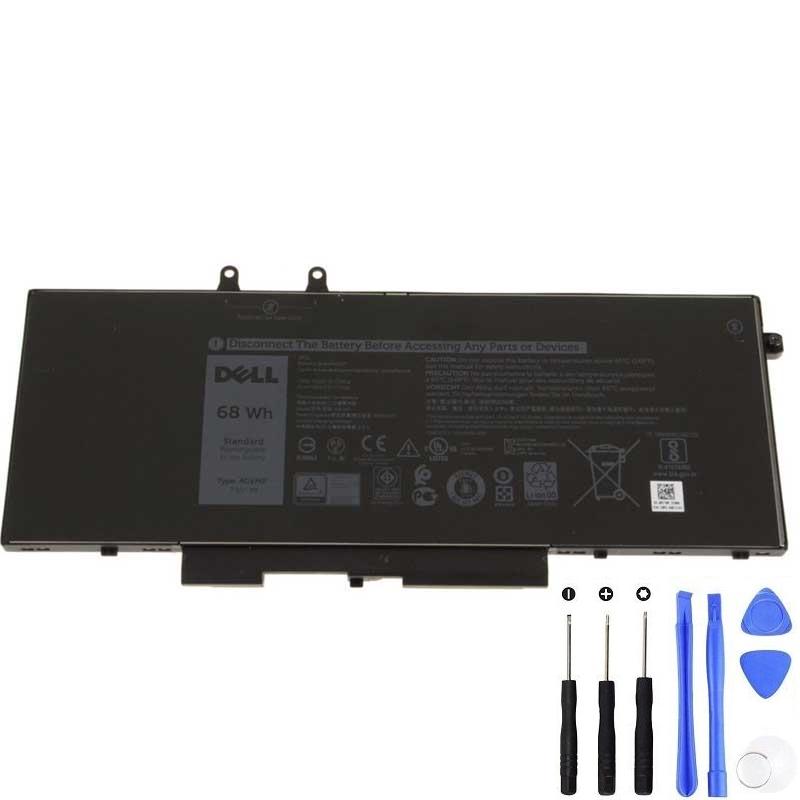
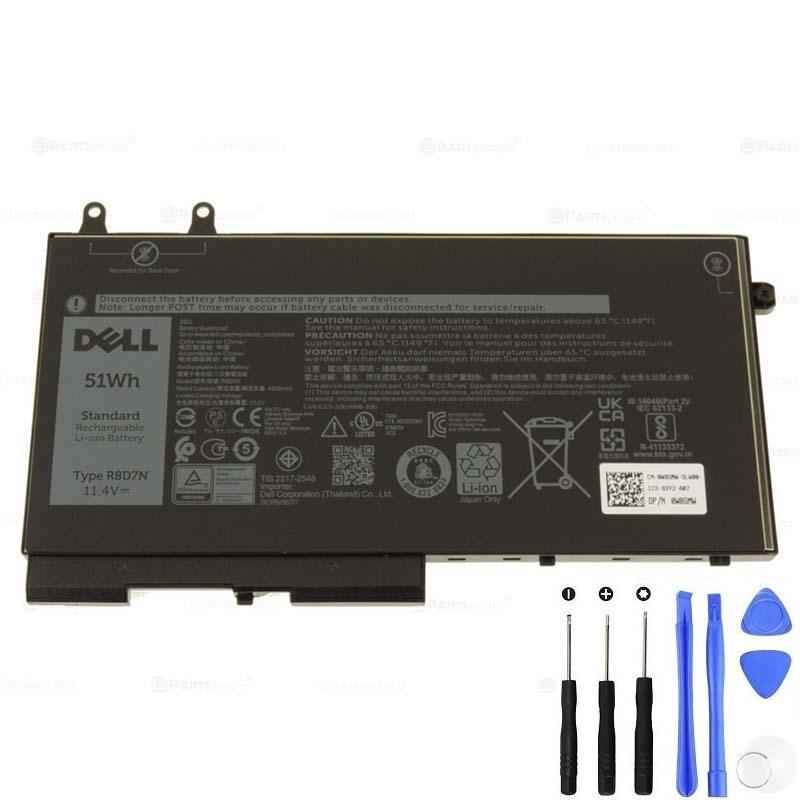
Which Latitude 5400 battery do you need?

The Latitude 5400 platform commonly uses two battery families:

  • 3-cell (11.4V group) — e.g., 51Wh RBD7N (also seen as R8D7N in some catalogs); earlier units may have a 42Wh 1V1XF.
  • 4-cell (15.2V group) — 68Wh 4GVMP for maximum runtime.

Good news for 42Wh fleets: the 1V1XF 42Wh can be directly replaced by the 51Wh RBD7N 3-cell for longer runtime in the same voltage group (drop-in replacement for Latitude 5400). If you’re planning a mix of 42Wh and 68Wh across a fleet order, note that 4-cell packs use a different voltage group and, in some chassis, the 4-cell length may conflict with a 2.5″ bay. If your IT team is asking “Latitude 5400 4-cell battery fits with 2.5" bay?” — verify the internal storage layout before bulk purchase.

Buying at scale: the keyword reality of procurement searches

When corporate and public buyers head to Google, they typically search with explicit commercial intent. If you’ve landed here by typing any of the below, you’re in the right place:

  • dell latitude 5400 battery bulk
  • latitude 5400 battery wholesale
  • latitude 5400 battery trade price
  • dell latitude 5400 battery supplier uk
  • latitude 5400 battery distributor
  • latitude 5400 battery b2b / for business
  • latitude 5400 battery fleet order
  • buy latitude 5400 battery in bulk
  • latitude 5400 battery 10 pack / 20 pack
  • latitude 5400 battery rfq / quotation / quote
  • dell latitude 5400 battery corporate pricing
  • latitude 5400 battery framework purchase

Capacity & P/N search terms (high-intent)

  • latitude 5400 42wh battery bulk
  • latitude 5400 68wh battery bulk
  • latitude 5400 3 cell battery wholesale
  • latitude 5400 4 cell battery wholesale
  • dell latitude 5400 battery replacement bulk
  • original / oem latitude 5400 battery bulk
  • high capacity latitude 5400 battery supplier
  • 1V1XF battery bulk / wholesale / supplier
  • RBD7N (R8D7N) battery bulk / wholesale / supplier
  • 4GVMP 68Wh battery distributor uk

Public-sector routes: CCS framework & NHS procurement

For UK government, councils, and the NHS, a framework purchase keeps things compliant and fast. Buyers often search for a ccs supplier uk and reference RM6098 or ask for a call-off contract. NHS buyers may prefer an NHS procurement route. We support purchase orders (PO), provide a VAT invoice, and can help align to your tender / RFX process or approved supplier lists.

Logistics, compliance & service (what fleet managers ask)

  • UK stock & lead time — ask for current lead time on 10 pack / 20 pack quantities and beyond.
  • Next day delivery — available on many SKUs; consolidated shipments for multi-site rollouts.
  • Free shipping — available on qualifying orders; please check destination and service level.
  • 12 month warranty — standard coverage; extended options available for enterprise.
  • WEEE/RoHS compliant — end-of-life recycling program support available.
  • Bulk discount — structured pricing for wholesale/corporate volumes.

OEM vs original: what’s right for business?

Searches like “latitude 5400 battery oem vs original for business” reflect a practical trade-off. For fleets, we prioritise safety, performance, and traceability: correct voltage group, robust BMS, consistent capacity, and documented compliance. If you need an “approved supplier” pack for a specific program, tell us early so we can align part numbers and paperwork.

FAQ for bulk buyers

Can I mix 42Wh and 68Wh batteries in a single fleet?

Yes, many fleets do, but keep voltage groups consistent per unit. The 1V1XF 42Wh (3-cell) can be replaced by the 51Wh RBD7N (3-cell) to standardise runtime. The 4GVMP 68Wh (4-cell) is a different voltage group and may change internal clearances; check any 2.5″ bay usage before rollout.

Where to buy Latitude 5400 battery wholesale UK?

Right here — see the product links above for 4GVMP 68Wh and RBD7N 51Wh. Contact us for bulk price UK, multi-site delivery and PO billing.

Do you support RFQ / quotation / quote and corporate pricing?

Yes. Send your SKU/quantity and any framework requirements (e.g., RM6098, call-off paperwork). We’ll reply with trade price, lead time, next day delivery options, and a formal VAT invoice once confirmed.

Do you have UK stock? What about free shipping?

We maintain UK stock on common Latitude 5400 batteries. Free shipping is available on qualifying orders; we’ll confirm service level in your quote.

How to request a bulk quotation (RFQ)

  1. Tell us the part(s): 4GVMP 68Wh, RBD7N 51Wh (or 1V1XF 42Wh to be replaced by 51Wh).
  2. Quantities (e.g., 10 pack / 20 pack, or fleet total).
  3. Sites and delivery windows (next day delivery if urgent).
  4. Compliance paperwork required (WEEE/RoHS, recycling program, framework references like RM6098).
  5. Billing preferences (purchase order / PO, VAT invoice, any tender/RFX IDs).

Quick links (high-intent product pages)


Bottom line: Whether you searched for dell latitude 5400 battery bulk, latitude 5400 battery wholesale, trade price, supplier UK, distributor, b2b, or a framework purchase under RM6098, you can standardise on RBD7N 51Wh for everyday devices and deploy 4GVMP 68Wh where maximum runtime is required. Ask for an RFQ/quotation today — bulk discount, UK stock, next day delivery, and 12 month warranty support your rollout.
Posted on Leave a comment

Finding the Right Charger for Your Surface Device: A Comprehensive Guide

Introduction:
Your Surface device is a versatile tool that helps you stay productive and entertained, but it won’t get far without a reliable charger. With a variety of Surface models available, finding the right charger can sometimes be confusing. In this guide, we’ll walk you through the steps to ensure you get the perfect charger for your Surface device.

Know Your Surface Model:
The first step in finding the right charger is to identify your Surface model. Microsoft offers several Surface devices, such as Surface Pro, Surface Laptop, Surface Go, and Surface Book, each with its own unique charging requirements. To find out which Surface model you have, check the device’s label, system settings, or product documentation.

Retrieving the SKU by using PowerShell
Use the following PowerShell command to pull the System SKU information:

PowerShellCopy

(Get-CimInstance -Namespace root\wmi -ClassName MS_SystemInformation).SystemSKU

Retrieving the SKU by using System Information
You can also find the System SKU and System Model for a device in System Information. To do this, follow these steps:

  1. Select Start, and then type MSInfo32 in the search box.
  2. Select System Information.

Using the SKU in a task sequence WMI condition
You can use the System SKU information in the Microsoft Deployment Toolkit (MDT) or Microsoft Endpoint Configuration Manager as part of a task sequence WMI condition.

DeviceSystem ModelSystem SKU
Surface 3 Wi-FiSurface 3Surface_3
Surface 3 LTE AT&TSurface 3Surface_3_US1
Surface 3 LTE VerizonSurface 3Surface_3_US2
Surface 3 LTE North AmericaSurface 3Surface_3_NAG
Surface 3 LTE outside of North America and Y!mobile in JapanSurface 3Surface_3_ROW
Surface Book 2 13″Surface Book 2Surface_Book_1832
Surface Book 2 15″Surface Book 2Surface_Book_1793
Surface Book 3 13″Surface Book 3Surface_Book_3_1900
Surface Book 3 15″Surface Book 3Surface_Book_3_1899
Surface Go CommercialSurface GoSurface_Go_1824_Commercial
Surface Go ConsumerSurface GoSurface_Go_1824_Consumer
Surface Go LTE CommercialSurface GoSurface_Go_1825_Commercial
Surface Go 2 CommercialSurface Go 2Surface_Go_2_1926
Surface Go 2 ConsumerSurface Go 2Surface_Go_2_1901
Surface Go 2 LTESurface Go 2Surface_Go_2_1927
Surface Go 3 CommercialSurface Go 3Surface_Go_3_1926
Surface Go 3 ConsumerSurface Go 3Surface_Go_3_1901
Surface Go 3 LTESurface Go 3Surface_Go_3_2022
Surface Go 4Surface Go 4Surface_Go_4_2067
Surface Hub 2S 50″Surface Hub 2SSurface Hub 2S
Surface Hub 2S 85″Surface Hub 2SSurface Hub 2S 85
Surface LaptopSurface LaptopSurface_Laptop
Surface Laptop 2 CommercialSurface Laptop 2Surface_Laptop_2_1769_Commercial
Surface Laptop 2 ConsumerSurface Laptop 2Surface_Laptop_2_1769_Consumer
Surface Laptop 3 13″ IntelSurface Laptop 3Surface_Laptop_3_1867:1868
Surface Laptop 3 15″ AMDSurface Laptop 3Surface_Laptop_3_1873
Surface Laptop 3 15″ IntelSurface Laptop 3Surface_Laptop_3_1872
Surface Laptop 4 13″ AMDSurface Laptop 4Surface_Laptop_4_1958:1959
Surface Laptop 4 13″ IntelSurface Laptop 4Surface_Laptop_4_1950:1951
Surface Laptop 4 15″ AMDSurface Laptop 4Surface_Laptop_4_1952:1953
Surface Laptop 4 15″ IntelSurface Laptop 4Surface_Laptop_4_1978:1979
Surface Laptop 5 13″ ConsumerSurface Laptop 5Surface_Laptop_5_1950:1951
Surface Laptop 5 13″ CommercialSurface Laptop 5Surface_Laptop_5_for_Business_1950:1951
Surface Laptop 5 15″ ConsumerSurface Laptop 5Surface_Laptop_5_1979
Surface Laptop 5 15″ CommercialSurface Laptop 5Surface_Laptop_5_for_Business_1979
Surface Laptop GoSurface Laptop GoSurface_Laptop_Go_1943
Surface Laptop Go 2Surface Laptop Go 2Surface_Laptop_Go_2_2013
Surface Laptop Go 3Surface Laptop Go 3Surface_Laptop_Go_3_2013
Surface Laptop SESurface Laptop SESurface Laptop SE
Surface Laptop StudioSurface Laptop StudioSurface_Laptop_Studio_1964
Surface Laptop Studio 2Surface Laptop Studio 2Surface_Laptop_Studio_2_2029
Surface Pro (5th Gen)Surface ProSurface_Pro_1796
Surface Pro with LTE Advanced (5th Gen)Surface ProSurface_Pro_1807
Surface Pro 6 CommercialSurface Pro 6Surface_Pro_6_1796_Commercial
Surface Pro 6 ConsumerSurface Pro 6Surface_Pro_6_1796_Consumer
Surface Pro 7Surface Pro 7Surface_Pro_7_1866
Surface Pro 7+Surface Pro 7+Surface_Pro_7+_1960
Surface Pro 7+ LTESurface Pro 7+Surface_Pro_7+_with_LTE_Advanced_1961
Surface Pro 8Surface Pro 8Surface_Pro_8_for_Business_1983
Surface Pro 8 ConsumerSurface Pro 8Surface_Pro_8_1983
Surface Pro 8 LTESurface Pro 8Surface_Pro_8_for_Business_with_LTE_Advanced_1982
Surface Pro 9 ConsumerSurface Pro 9Surface_Pro_9_2038
Surface Pro 9 CommercialSurface Pro 9Surface_Pro_9_for_Business_2038
Surface Pro 9 with 5G (U.S.)Surface Pro 9Surface_Pro_9_With_5G_1997
Surface Pro 9 with 5G (outside of U.S.)Surface Pro 9Surface_Pro_9_With_5G_1996
Surface Pro X with SQ1 processorSurface Pro XSurface_Pro_X_1876
Surface Pro X with SQ2 processorSurface Pro XSurface_Pro_X_H_1876
Surface Pro X (Wi-Fi)Surface Pro XSurface_Pro_X_2010
Surface StudioSurface StudioSurface_Studio
Surface Studio 2Surface Studio 2Surface_Studio_2_1707_Commercial
Surface Studio 2+Surface Studio 2+Surface_Studio_2+_2028

Understand the Charging Port:
Different Surface devices feature various types of charging ports. Some common port types include the Surface Connect, USB-C, and Micro USB. It’s crucial to determine which port your Surface device uses before selecting a charger.

Check Power Requirements:
The power requirements of your Surface device are critical to choosing the right charger. You can often find this information in the device’s documentation or by searching online. Ensure that the charger you select can provide the necessary wattage and voltage for your Surface device.

You will always be able to find the correct charger for your Surface here, as all the Surface Charger models are covered.
Surface ModelOriginal Charger Model WattCharger Recommended
Surface RT153648W48W Charger
Surface 2153648W48W Charger
Surface 3162313W13W Charger
Surface Go173524W44W Charger
Surface Go with LTE Advanced173524W44W Charger
Surface Go 2173524W44W Charger
Surface Go 2 with LTE Advanced173524W44W Charger
Surface Go 3173524W44W Charger
Surface Go 4173524W44W Charger
Surface Pro (1st Gen)153648W48W Charger
Surface Pro 2153648W48W Charger
Surface Pro 3162536W36W Charger
Surface Pro 4162536W36W Charger
Surface Pro 4 Core M SKU173524W44W Charger
Surface Pro (5th Gen)180044W44W Charger
Surface Pro (5th Gen) M3 SKU173524W44W Charger
Surface Pro (5th Gen) with LTE Advanced180044W44W Charger
Surface Pro 6180044W44W Charger
Surface Pro 7170665W65W Charger
Surface Pro 7+170665W65W Charger
Surface Pro X170665W65W Charger
Surface Pro 8170665W65W Charger
Surface Pro 9 5G196339W44W Charger
Surface Pro 9 170665W65W Charger
Surface Book (1st Gen with Nvidia GPU)170665W65W Charger
Surface Book (1st Gen without Nvidia GPU)162536W36W Charger
Surface Book (1st Gen with Performance Base)1798102W102W Charger
Surface Book 2 13 inch (with Nvidia GPU)1798102W102W Charger
Surface Book 2 13 inch (without Nvidia GPU)180044W44W Charger
Surface Book 2 15 inch1798102W102W Charger
Surface Book 3 13.5" (with Nvidia discrete GPU)1798102W102W Charger
Surface Book 3 13.5" (without Nvidia discrete GPU)170665W65W Charger
Surface Book 3 15"1932127W127W Charger
Surface Laptop (1st Gen)180044W44W Charger
Surface Laptop 2180044W44W Charger
Surface Laptop 3170665W65W Charger
Surface Laptop 4170665W65W Charger
Surface Laptop 5170665W65W Charger
Surface Laptop Go196339W44W Charger
Surface Laptop Go 2196339W44W Charger
Surface Laptop Go 3196339W44W Charger
Surface Laptop Studio (with Nvidia discrete GPU)1932127W127W Charger
Surface Laptop Studio (with Nvidia discrete GPU)1798102W102W Charger
Surface Laptop Studio (without Nvidia discrete GPU)170665W65W Charger
Surface Laptop Studio 2(with Nvidia discrete GPU)1932127W127W Charger
Surface Laptop Studio 2(with Nvidia discrete GPU)1798102W102W Charger
Surface Laptop Studio 2(without Nvidia discrete GPU)170665W65W Charger

Authentic Microsoft Chargers:
Whenever possible, opt for authentic Microsoft chargers. These chargers are designed to meet the exact specifications of your Surface device, ensuring a safe and efficient charging experience. Microsoft chargers are widely available and can be purchased from official Microsoft stores or authorized retailers.

Third-Party Chargers:
If you can’t find an authentic Microsoft charger or are looking for more affordable alternatives, third-party chargers can be an option. However, exercise caution when choosing a third-party charger. Look for reputable brands with positive reviews, and ensure that the charger meets the specific requirements of your Surface model.

USB-C Chargers:
Some Surface devices feature USB-C ports, which can be convenient because they’re a universal standard. However, not all USB-C chargers are created equal. Ensure that the charger you choose supports Power Delivery (PD) and provides the necessary power output for your Surface device.

Consider Portable Chargers:
If you’re always on the go, a portable charger or power bank can be a handy accessory. Look for a power bank with the right port and power output to charge your Surface device. These devices can provide additional battery life when you’re away from an electrical outlet.

Cable Length and Quality:
Don’t forget to consider the length and quality of the charging cable. Ensure that the cable is long enough to reach a power source comfortably. High-quality cables are less prone to wear and tear, ensuring a longer lifespan.

Conclusion:
Selecting the right charger for your Surface device is essential for maintaining its performance and longevity. Start by identifying your Surface model, understanding the charging port, and knowing the power requirements. Whenever possible, opt for authentic Microsoft chargers, but if you choose third-party options, do so cautiously. By following these guidelines, you can ensure that your Surface device is always ready for action, keeping you productive and connected.

Posted on 2 Comments

How to find the correct charger for your Surface?

The below table shows the power supply units for different Surface models. You can find the correct the charger by the Model of your Surface or the Model for the original power supply that came with your Surface.

  • If you’re not sure what Surface model you’re using, turn on your Surface, select the Start button, type system information, and select it from the list of results. The model info for your Surface will appear next to System Model. You can also use the Surface App by selecting Your Surface. The model information is listed next to SKU.
  • The model number for the power supply unit that came with your Surface is in small print on the bottom of the unit.(You find the videos below showing how to find the model number)

You will always be able to find the correct charger for your Surface here, as all the Surface Charger models are covered.

Surface ModelOriginal Charger Model WattCharger Recommended
Surface RT153648W48W Charger
Surface 2153648W48W Charger
Surface 3162313W13W Charger
Surface Go173524W44W Charger
Surface Go with LTE Advanced173524W44W Charger
Surface Go 2173524W44W Charger
Surface Go 2 with LTE Advanced173524W44W Charger
Surface Go 3173524W44W Charger
Surface Go 4173524W44W Charger
Surface Pro (1st Gen)153648W48W Charger
Surface Pro 2153648W48W Charger
Surface Pro 3162536W36W Charger
Surface Pro 4162536W36W Charger
Surface Pro 4 Core M SKU173524W44W Charger
Surface Pro (5th Gen)180044W44W Charger
Surface Pro (5th Gen) M3 SKU173524W44W Charger
Surface Pro (5th Gen) with LTE Advanced180044W44W Charger
Surface Pro 6180044W44W Charger
Surface Pro 7170665W65W Charger
Surface Pro 7+170665W65W Charger
Surface Pro X170665W65W Charger
Surface Pro 8170665W65W Charger
Surface Pro 9 5G196339W44W Charger
Surface Pro 9 170665W65W Charger
Surface Book (1st Gen with Nvidia GPU)170665W65W Charger
Surface Book (1st Gen without Nvidia GPU)162536W36W Charger
Surface Book (1st Gen with Performance Base)1798102W102W Charger
Surface Book 2 13 inch (with Nvidia GPU)1798102W102W Charger
Surface Book 2 13 inch (without Nvidia GPU)180044W44W Charger
Surface Book 2 15 inch1798102W102W Charger
Surface Book 3 13.5" (with Nvidia discrete GPU)1798102W102W Charger
Surface Book 3 13.5" (without Nvidia discrete GPU)170665W65W Charger
Surface Book 3 15"1932127W127W Charger
Surface Laptop (1st Gen)180044W44W Charger
Surface Laptop 2180044W44W Charger
Surface Laptop 3170665W65W Charger
Surface Laptop 4170665W65W Charger
Surface Laptop 5170665W65W Charger
Surface Laptop Go196339W44W Charger
Surface Laptop Go 2196339W44W Charger
Surface Laptop Go 3196339W44W Charger
Surface Laptop Studio (with Nvidia discrete GPU)1932127W127W Charger
Surface Laptop Studio (with Nvidia discrete GPU)1798102W102W Charger
Surface Laptop Studio (without Nvidia discrete GPU)170665W65W Charger
Surface Laptop Studio 2(with Nvidia discrete GPU)1932127W127W Charger
Surface Laptop Studio 2(with Nvidia discrete GPU)1798102W102W Charger
Surface Laptop Studio 2(without Nvidia discrete GPU)170665W65W Charger

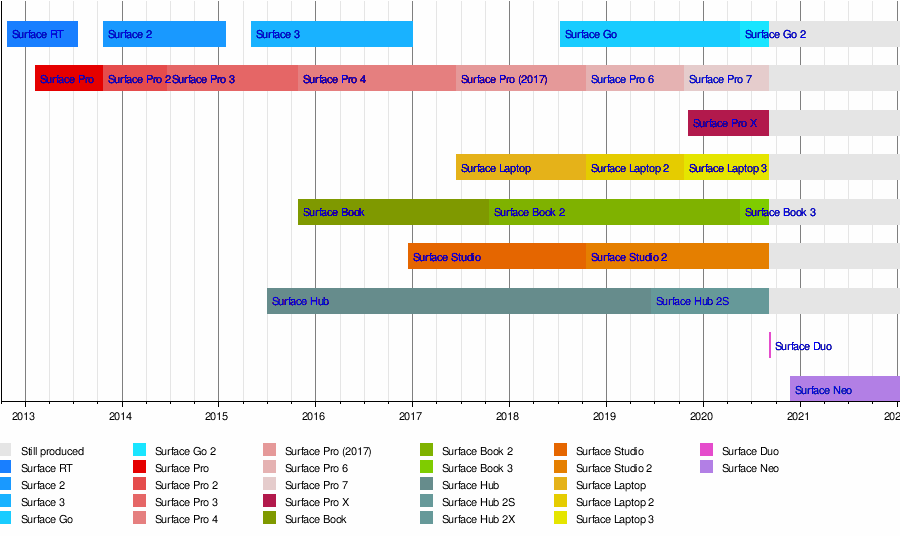
Surface Timeline

The videos showing how to find model number for the original power supply